
WordPress Theme – AdWords ready ?

By Andy the stuff doer

Oh Yes! Of course I want my WordPress theme to be AdWords and Widget ready. But hang-on what does it actually mean. 

Well, widget ready seems to mean widgets can be added to the side bar using a simple click and drag interface.  If it’s not “Widget Ready” widgets can still be added by adding code to the .PHP files.  The theme I’m using isn’t widget ready so, for now, I’ll leave the subject of widgets. When I’ve delved in to the .PHP I’ll come back to it.

AdWord Ready   – The theme I’ve got has AdWords already displayed. Always on the lefthand sidebar, on single posts there’s a box in actual text, on the home page there’s a “Link Unit” etc.  AdWords came up as soon as I activated the theme.

Something to change straight away. The AdSense Publisher ID used is the theme designers so any revenue will go straight to the designer not myself.  

A quick look at how the AdWords are included –

  1. Each AdWords position in the blog has its own .PHP file . These files includes the code that AdSense generates when you create an advert. For more about the code check out Google AdSense Note: AdWords is for advertisers, AdSense is for Publishers.
  2. PHP section files call up the AdSense PHP File
  3. The PHP page files then calls up the PHP section – you then have a page with AdWords displayed.

The AdWords are mentioned in the CSS stylesheet but only with the instruction to add a margin at the bottom.

For me to have my own AdSense adverts with revenue coming to me, I had two options.

1.  Just change the Publisher ID code in the AdSense .PHP files. The Adword format would not change but the revenue would come to me.

2. Create new adverts through AdSense to match my revised theme. The procedure in AdSense generates a few lines of code that can be copied and pasted in to the relevant AdSense .PHP  files.

I went for the second option and soon had it sorted. I just had to make sure the new Adverts where the same size as the old ones.

Now I’m at a stage where I’m happy, for now, with the look and function of the blog.  It’s time to get a few pages sorted on the Web Site.
WordPress Themes – Diving into CSS

By Andy the stuff doer

I’ve had a couple of days playing around at this and have made reasonable progress.

I downloaded a theme that was close to what I need and dived in to the CSS to make the changes.  The CSS only changes the size and appearance of the various elements. To have full control over what actually ends up on the screen will take changes to the .php files.

I should point out that Ive been working on it “live” with no back-ups or safety measures in place. This means if I cock-up I’ll be stuffed. The only precaution I’m taking is to just modify one line in the CSS at a time.

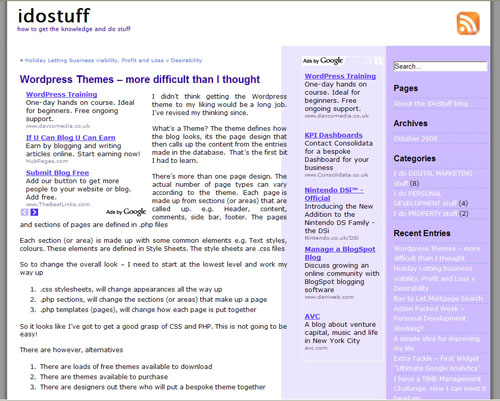
To explain what I’ve done so far an image will be useful. So here it is (first image post)

screen grab 1

he he – that’s worked

So this what I’ve done, remember all the changes I’ve made are in stylesheet.css.  This is accessed from the dashboard – Appearance – Editor.

  1. Change the Header Background. The Header section of the stylesheet calls up a graphic. The Graphics are located in an image sub directory of the  theme. Using the CPanel file manger I downloaded and then modified it in photoshop. After up-loading the new graphic (just plain white), the revision shows up when the blog is viewed.
  2. The Head text was now white and therefore invisible. To change this I had to find where the colour is specified in the stylesheet and change the Hexidecimal colour reference to black. It took some locating the right “Header H1” reference but after some trial and error I cracked it.  For more on the hex codes I found the Wikipedia Web Colors article useful.
  3. In in similar why to changing the Header Graphic, I changed the background to the main body. This graphic repeats down the page to give the two coloured columns. You can see on the Graphic above, It doesn’t quite match the text column widths, a later adjustment sorted this out.
  4. In the Sidebar section of the stylesheet I eventually found the right colour reference to change the text to white.
  5. Adjusting the column widths was tricky as the positioning of them relates to each other.  This again took me much trial and error.  I eventually cracked it when I realised the Sidebars are defined initially as the same size but  this is overridden further down the stylesheet with specifications for “sidebar left and side bar right”. It took some tweaking to get the Left side bar a tighter fit for the AdWord size.
  6. Padding and Margins needed looking at to get the text sitting well in the columns. Something it took some research to get my head round. PADDING – is space on the inside, just like traditional margins on a sheet of paper, MARGIN- is space on the outside, like a picture frame around a painting.  E’ it’s a Topsy turvy world.

By this time I was coming to the conclusion that the CSS Stylesheet for the free theme I had downloaded was very messy. I’m sure it could be tidied up and simplified.

My advise on this would be – “Find a well coded theme to start learning on”

However I’ve got it looking close to what I’m after and no doubt I’ll tweak it more some other time. Or I might even start again using my advise from above.

WordPress Themes – basics from square one

By Andy the stuff doer

I didn’t think getting the WordPress theme to my liking would be a long job. I’ve revised my thinking since.

What’s a Theme? The theme defines how the blog looks, its the page design that then calls up the content from the entries made in the database.  That’s the first bit I had to learn.

There’s more than one page design. The actual number of page types can vary according to the theme. Each page is made up from sections (or areas) that are called up. e.g. Header, content, comments, side bar, footer. The pages and sections of pages are defined in .php files

Each section (or area) is made up with some common elements e.g. Text styles, colours. These elements are defined in Style Sheets. The style sheets are .css files

So to change the overall look – I need to start at the lowest level and work my way up

  1. .css stylesheets, will change appearances all the way up
  2. .php sections, will change the content of sections (or areas)
  3. .php templates (pages), will change how the .php sections are put together to make a page

So it looks like I’ve got to get a good grasp of CSS and PHP. This is not going to be easy!

There are however, alternatives

  1. There are loads of free themes available to download
  2. There are themes available to purchase
  3. There are designers out there who will put a bespoke theme together

I had a look at some of the free themes, they are easy to download as zip file then open up through the WordPress dashboard.  Of the five I’ve looked at two came up with errors, when it’s free you take your chance. There is one I quite like that says it’s optimised for SEO and AdWords. 

Before I look at buying or commissioning a theme I’m going to have play at customising this. Two goals in mind, getting the right look for my blog and learning some of the programming involved.

Before I dive into it using the theme editor on WordPress I’ll investigate what off-line options are available.

Update:  I’ve had a good look round and found a few options.

Highly Recomendedwww.yvoschaap.com/wpthemegen/ This is free on-line generator . I really wish I had found this a few days ago. In fact I might give it ago as the code for Theme I’m working on seems to be all over the place.

www.artisteer.com Downloadable 1month free trial software

www.themedreamer.com This is plugin for Dreamweaver so Themes can be worked on easily with WYSIWIG.

Holiday Letting business viability, Profit and Loss v Desirability

By Andy the stuff doer

Running a Holiday Letting business is a real option for us. It would involve buying a property then running it as a business. Considering actually doing it involves weighing up the desire to have a property in a specific location for our own occasional use against the effort and financial aspects.

I like to work on figures so I’ve created a spreadsheet to model the business. The spreadsheet puts together the income and costs, then makes a simple comparison against alternative investments. What it doesn’t do, is to factor in the desirability of owning and using the property. I also need to consider the time and effort that would have to be put in.

If you are looking at this sort of investment, you might what to download the spreadsheet and plug your own figures in.

Furnished holiday let viability calculator

Brief explanation of the spreadsheet

Enter your figures in the blue cells

Purchase price /deposit, used further down to factor in mortgage payments and other potential investments.

Fees and set up, add on purchase costs and 1 off set up costs

Price per week, check out the competition and set likely prices

Occupied, enter f for a full week, 1 for a 3 day short break and 2 for two short breaks in 1 week. The part week rate gives the price for these.

The graph shows the income per week. The sample figures I’ve used indicate a property that is either unpopular or under marketed.

Variable costs Booking related, Agents fee, cleaning per occupancy,gas/electric per year estimate if fully occupied.

Fixed costs, unavoidable overheads per year

The results of this section are in the Basic Balance Box.

Having the figures in this format allows a quick assment various scenarios. What if we can increase prices? What if we market it better to increase occupancy? etc.

The rest of the sheet is me playing about with considerations for me to throw in to the mix. Answering questions like.

  1. What if I just kept the money in a high interest account.
  2. Whats the growth on the property value
  3. How does it compare against two residential property lets
  4. Whats the cash flow implications taking in to account tax and tax credits.

If you get this far down on the sheet let me know and explain it some more.

We’ve not come to any decisions yet but at least with this we can back up our thoughts with some hard figures.

Buy to Let Mortgage Search

By Andy the stuff doer

Searching for and then comparing buy to let mortgage deals is a hell of a lot harder than it used to be. Although the availability of residential mortgage products has increased, lenders are avoiding Buy to Lets.

Little competition in the market has lead to the lenders devising even more devious way of disguising how expensive they are. It’s taken me plenty of head scratching to work out the best deal for me.

I started with the normal comparison site searches then delved deeper into the details of the better looking offers. I also tried the more specialists sites and a broker. 

All the info I fed in to a spreadsheet so I could quickly asses and compare the products using my own criteria. The spreadsheet takes into account.

  • Initial Rate
  • Initial Rate period
  • Follow on rate
  • Arrangement fees
  • Valuation fees
  • Other fees eg. broker
  • Loan interest to rental income criteria

I could develop the spread sheet further but if you want to try it out for yourself, here it is-

Buy To Let Mortgage Comparator Spreadsheet   

I enter the necessaries in the green cells and the results are given as running and averaged totals over 1,2,3,4 & 5 years. I’ve based my decision on these figures. 

It doesn’t give the monthly payment as it a pointless figure for a comparison.

I’ve left some figures in the download so you can see how it works. The interest to rental part was really useful to set the loan to value for the Natwest criteria.

Have a play and let me know what you think.

I’ve ended up going for the Natwest option, It helps that I’m an existing customer and get free valuation and legal costs. The Bank of China option looks really interesting if you can get to one of their branches to apply directly. I’d like to hear of any experience you might have.

Good luck with your search.


Action Packed Week – Personal Development Working?

By Andy the stuff doer

Friday night 9.30. Retired to garage with laptop, a can beer and some excellent Robert Plant (Mighty Rearranger). And I’ve just had a WOOO! moment, nice when they come along. The track All The Kings Horses is based on the Zeplin track Bron-Yr-Aur. Why WHOOO? Because that’s the track I used on my Mind movie. I’ll write about the Mind Movie another time.

Anyway I’m in the garage combining two things at once, doing some writing whilst enjoying a spot of relaxing. I really need to get a few ideas down and I’ll see now it goes.

I had a busy week, looking and analysing the long list from the last post. I picked a few things to prioritize, in different areas, that I could combine.

Mortgage a property – went all over the web looking for the best mortgage deals, thought about it, did the maths and made the application, accepted in principle.

Holiday Let Business – The misses is really keen on the this and its on Goals list. I’ve developed a nifty spread sheet to model the business and assess viability. It’s worth careful consideration of potential pleasure derived weighed against financial expediency. So I’ve got myself another post to do on that.

Oh, just thought. This post is extremely diverse. Against all SEO advise. But what the Hell.

Other Financial investments – I’ve read and am still processing the “Liquid Millionaire” book from Stephen Sutherland. An immediate conclusions is to shift my Stocks and Shares ISA to web based platform. With this I’ll be able to sell the funds and hold the proceeds in cash. Still within the ISA wrapper but out in a holding position for when the the markets go tits up again. This took a fair bit of thinking time as well.

Dying and Stairs – This job starts with laborious sanding, followed by laborious dyeing. So plenty of thinking time! (approx 10hrs) YES get in there, successful application of time

Tenant moving in – Sorted the paperwork, switching utilities etc.

Fixed a tenants toilet – Just needed doing, but a good opportunity for a chat and a catch up.

Resurfacing bath- ordered the “Tuby” kit after researching on web. This look like a good one to write up in the DIY category. Asked the tenant when’s the best time to have her bath out of action for three days? An important question to ask when you have 3 young kids.

Trike Building – Had a play with the lathe, turning a little jig to re-drill the wheel stud holes at 100mm PCD… Pure Pleasure:)

Job Earning – Turned down a job from a Client. The advert artwork he wanted was to support a customer profile article in a magazine. I spotted all the Hallmarks of a Clever Magazine. Scam I’d seen versions of before. I did a bit of research and let him know. He’s canceled the advert booking and spread the word. (note to self: write a post on scam under I do professional Stuff, how to recognize the scam. Trade Journal editor contact for write up and link)

My client and others will be saving a few thousand quid as a result. I lost out a couple of hundred quid but bought bought a massive amount of Good Will. If some one says “ you cant bank good will” they can shove it. My AGB Marketing Support Business live on Word of Mouth, My Customers are my Ambassadors.

What I have neglected is writing, hence Friday night with beer and some sounds. Peter Gabriel “UP” now.

Looking back, it’s really has been not just a busy week but a productive and positive week.

Maybe this personal development stuff really is working, kind of without me noticing at the time.

Doing Less Negative Stuff and Doing More Positive Stuff seems to work when I’m considering how to fill my time, doubling jobs up and WOW! The Mind Movie.

Enough for now. 11 o’clock time to sink in to PG.


A simple idea for improving my life

By Andy the stuff doer

Do Less Negative – Do More Positive , DLN-DMP

A fantastically simple concept to improve life and well being.  I like distilling ideas down to a simple essence. This is a concept I’m likely to remember and apply.

Last night I went to pub, just for ONE pint. Four pints of Hobgoblin later, I ended up going to bed late, having disturbed sleep, feeling rough and annoyed when I eventually crawled out of my pit. I’m now determined to remember and apply the DLN-DMP concept  to the little decisions and reap the benefits.

If I had applied this concept last night, I would have been happier, healthier and more productive today. It’s so simple.

Why did I choose to drink more than intended? Because the decision was based on the short term desire to drink more of a very tasty beer. I wasn’t think of the decision in terms of improving anything. I didn’t have this little bit of insight/knowledge to apply.

It’s a concept I’ve only just read about, this also makes a powerful argument for me to read more of the right kind of books. 

This particular book I just finished today, whilst in the bath, in recovery mode. So all credit to Stephen Sutherland and his book “Liquid Millionaire”.  The book’s tag line is “How to make millions from the up and coming stock market boom”.  I wasn’t expecting to learn more than the possibility to get a edge on financial markets, however the book gives great deal more. This particular little gem came on page 182 and comes under the  heading ” How to Live Your Dream Lifestyle Now”. 

Stephen suggests identifying the things that cause stress, unhappiness, anxiety or make you feel out of control, then do less of those things. At the same time identify the things that make you feel good (I’m sure that means, not the superficial taste of beer) and do more of those things.

I might be having a slightly different take on this idea but as it’s so simple, it lends it’s self to being applied easily to every day decision making.  

I should say the rest of the book makes a fascinating read. I’ll be reading it again shortly to make sure I got the concepts straight and I’m ready to assimilate the knowledge.

So Many Thanks  Mr. Stephen Sutherland.

Extra Tackle – First Widget “Ultimate Google Analytics”

By Andy the stuff doer

I’m quite pleased with myself. I’ve manged to get google analytics to work on this WordPress blog.

I’ve used google analytics for almost a year, tracking my blogger blogs, my photography website and some of my clients sites.  By recording the number of hits and logging  where the traffic comes, it give the insight required to modify content and where best to increase the exposure that sites get. It’s this kind information that gives me the inspiration and motivation for doing more.

That said, it’s essential for me to do the same on the iDoStuff website and Blog.  This is how I did it:

I set up a new account within Google Analytics specific to the iDoStuff site.

This produces a few lines of code that needs to be added to each web page. No problem at all for the Website as there’s only one page. It will be a problem as the site expands so Ive got to research a way so the code goes where its need automatically.  This wasn’t the case with earlier versions as the code went in the root directory of site and did it’s magic from there.

With a Blog, manually putting the code on each page would be a nightmare, as pages are generated dynamically. After a brief search I found Ultimate Google Analytics. This is a small plug in that automatically adds the code to pages. The instructions are easy to follow and installation was relatively painless. The only tricky bit was using cPanel to copy the file in to the right directory and that was only because I hadn’t used it before, I learnt drag and drop doesn’t work.

Once in the right directory, WordPress picks it up and it’s available to install. The only set up necessary, although there’s plenty of bells and whistle to play with, is to add the reference number from Google analytics. 

I did this on Friday and checked Analytics on Monday to see if it had been picked up. It hadn’t so I checked a page by viewing the HTML and looking for the code, it was there right at the bottom of the page.  Analytics was telling me it hadn’t found the code, I searched around for solution and gave up, although the question had been asked a number of times, no useful answers are out there.  I logged back in to analytics a few hours latter and it was there, working.  So Patience is required!

To differentiate Web site Statistics from Blog Statistics, I created two profiles. The Google instruction are easy to follow to do this. Essentially one Website profile excludes any stats from sub-directories with/blogs/ in the URL and the Blog profile includes only /blogs/ Stats.

So now I can track how the site and blogs are doing in terms of visitors right from the big zero I have now.

I have a TIME Management Challange. How I can meet it head on.

By Andy the stuff doer

I’ve put my self in a situation where the Stuff of Life is going to be different for me.

Now I’ve started on this this route the possibilities see almost endless. There is now so much more I can be doing on top of all the stuff I need to do. This is throwing up a massive demand on my time. IT’S SOMETHING ELSE I’VE GOT TO SORT.

Work smarter not harder is something I often say to myself. The problem with that is to be smart about stuff requires knowledge and thought. 

I have a plan. Now people may advise to sub-stuff out and concentrate on my areas of specialism i.e. areas that I already know about and can perform in efficiently.  But I’m not really interested in the well trodden path. 

The plan is to divided and combine my time. 

e.g. 1. In one of my rented houses the bath needs resurfacing. I also need content for the ” I do DIY stuff” section of the blog.  So I’ll record the the resurfacing and post about it… two birds with one stone and all that.

2. Some of the “Doing” Stuff on my list involves laborious, brain numbing repetition.  Smart stuff requiring knowledge and thought starts with getting the information  (record the information and sources) for it to become real knowledge it needs thinking about.

Resurfacing a bath involves a lot of sanding and prep, whilst my hands are working on that I can be processing information in to knowledge… 3 birds with one stone 

If I can apply this technique with the right degree of focus I should be able to expand my time.

As a start on organising this, here’s the random “brainstorming ” list of stuff:

  • Resurface bath
  • Fix a toilet
  • Fix garage door surround and doors
  • Sort out a tenant moving in
  • Dye and varnish spiral stairs, shelves and cupboard
  • Take down Lathe and plaster ceiling
  • fit plaster board and plaster
  • fit sun tunnel
  • fit and wire up smoke alarms
  • Get final building regs approval on loft conversion
  • Re-point an outside toilet
  • fix slate toilet roof
  • renew 2 soffits
  • hard standing in front of garage
  • Mortgage a property
  • Find another house
  • Totally refurbish new house
  • Sort out my Tax planning
  • Action my Tax planning
  • Figure out what best to do with other investments
  • action other investments
  • Holiday Let investigation
  • Learn Web stuff
  • Action Web stuff
  • Learn to write better
  • Blog  and feed website with anything off this list
  • Learn Word press
  • Implement WordPress
  • Add Loft conversion info, structured to website
  • refine Sliding sash window designs
  • Make at least 5 windows to the above
  • Add Sash window info to website
  • draw up plans and instruction of sash window
  • Make plans available- paid for?
  • Add shopping system to website
  • Add income generation to website and blog
  • Have holidays
  • Relax regularly
  • Enjoy time with friends
  • Family time and support (so important it’s a bit like breathing)
  • Normal work, Photography and Marketing
  • Building Trike
  • top up loft insulation
  • Do more general housekeeping
  • Front room oak paneling
  • Iron railing and new wall at front
  • Re-pointing gable ends
  • Sealing walls
  • promoting website and blog

If this list is combined it will, at least look shorter. I need to break this down, combine, prioritise and scheduel   

“t’ll not take y’ two minutes” the misses will say.

Notes on Personal Developement

By Andy the stuff doer

This is subject I could struggle with, my view is based on personal experience and I’m not sure how much of myself I want to reveal.  Writing in the third person could help but maybe that’s not the honesty I’m after.  This is something I’ll have to address as I have a little theory (not very well developed). Sociologists and the like can pick me up on this if they wish:

Western societies used to have well defined codes of behaviour, structures, compartments and paths though life. This suited the ruling classes very well. Populations with minimal knowledge of anything else where either content resigned to their situations or dead. Development or education of people was encouraged if it was to benefit the rulers or the churches. In no way was it intended to be ‘personal’ development. However enough bright sparks thought ‘hang on’, we can use our knowledge to benefit the population at large and so the mish mashed societies we have eventually came in to being. These societies have evolved both blunt and subtle ways of maintaining themselves.

We get brought up, educated, entertained with very little conscious understanding of ourselves as individuals. We are generally nurtured to be an unquestioning part of groups, populations, cohorts, piers, classes, fashions and beliefs. I believe personal development is about stepping to one side of this, moving to different view point, taking a different direction, making your own path.

If you do this you stand the risk of ridicule.  This is probably where my reticence come from.

However by taking a different path I’ll end up in different hopefully better place. I want to go journey with others, maybe not to same place, it could get a bit crowded, joining another crowd / flock  isn’t the path that I see. I like the idea of meeting them on the way and swaping notes, it should make for an interesting and fulfilling journey.

We’ll have to see how well I end up writing about this subject as I make my way.